Black Friday SaleFree US shipping on every order
(888) 895-7080
Free Shipping Low Price Guarantee 30-Day Trial & Easy Returns
Free Shipping Low Price Guarantee Speak to a Pool Expert
Free 1–3 Day Shipping on Pool Robots Low Price Guarantee 30-Day Trial & Easy Returns

Buying Guide · Robot Features

The Best Robotic Pool Cleaners With a Weekly Timer, and How Each Timer Works

Clear water is mostly a matter of rhythm. These robots start their own cycles, but their timers are not alike, and the differences decide which one fits.

By the SpectraLight pool experts · Updated November 2026

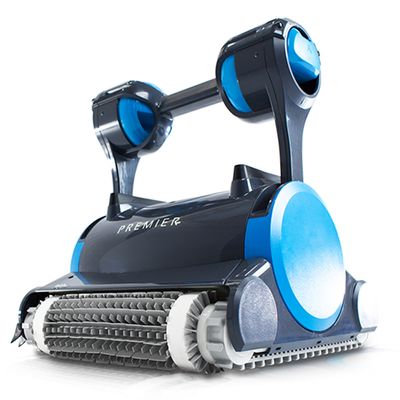
Dolphin Premier robotic pool cleaner

The Short Answer

The Dolphin Premier is our pick for a weekly timer you set once and forget: three presets on the power supply (every day, every 2 days or every 3 days) and no phone needed. Choose the Dolphin Sigma to pick exact days and times in an app. The Dolphin Quantum offers both a preset timer and an app, Clear S schedules weekly in its app, and the Dolphin Cayman has one setting: every day.

Debris does not wait for the weekend. Leaves sink within a day, then start to stain and break down; fine dust settles overnight and gets kicked back into the water by the first swimmer. A pool cleaned on a steady rhythm will usually look better than one cleaned thoroughly once a week, when somebody remembers. That rhythm is the reason to look for the best robotic pool cleaner with a weekly timer.

A weekly timer starts cycles automatically through the week, so cleaning becomes part of the pool and not a chore on your list. But the phrase covers several different things: three presets on a power supply, a day-by-day schedule in an app, or a single daily setting. The right robot is the one whose timer matches how you want to run it.

Our Picks, in Order

Our Weekly Timer Picks, in Order

Every price below is today’s price in our store.

  1. Pick 1: Simplest Set-and-Forget Weekly Timer

    Dolphin Premier

    The Premier's timer is the one we would hand to anyone, including someone who never wants to open an app. It lives on the power supply and offers three presets: every day, every 2 days or every 3 days. Its Multi-Media filtration includes an oversized leaf bag, which gives scheduled cycles more room in leaf season, and a full-filter indicator on the power supply shows when to empty it. The robot behind the timer covers floor, walls and waterline in in-ground pools as long as 50 ft.

    Best for
    In-ground pool owners who want regular cleaning from a button on the power supply, with no phone involved.
    Keep in mind
    Presets set the interval, not particular days or hours. If you need the robot to run only on certain days, look at the Sigma.
    See the Dolphin Premier
  2. Pick 2: Weekly Scheduler by Day and Time

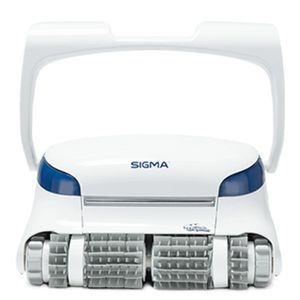
    Dolphin Sigma

    Where the Premier repeats an interval, the Sigma follows a calendar. Its weekly scheduler in the myDolphin Plus app lets you choose which days it runs and at what time, so you can clean on Monday, Wednesday and Friday mornings and leave the weekend clear for swimming. The app connects over Wi-Fi and Bluetooth and sends a filter alert, which matters when cycles start without you. Behind the schedule is the most capable Dolphin here: three ProLine motors, quad brushes and a 2.5-hour cycle.

    Best for
    Owners who want cleaning on particular days and hours and are happy to manage it from a phone.
    Keep in mind
    Scheduling is done in the app, so it suits owners comfortable with a phone. It is the highest-priced pick and the heaviest Dolphin at 24.6 lb.
    See the Dolphin Sigma
  3. Pick 3: A Preset Timer and an App in One Robot

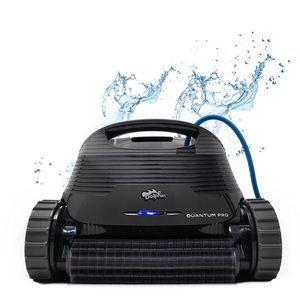
    Dolphin Quantum

    The Quantum gives you both styles. On the power supply is a weekly timer with three presets: every day, every 2 days or every 3 days, with no phone required. In the myDolphin Plus app, over Wi-Fi, you can also start, stop and schedule cycles and receive alerts. That suits a household where one person wants a button and another wants an app. An XXL MaxBin basket with over 400 sq in of filter area holds a lot between emptying, and it is the lowest-priced robot here rated for 50 ft pools.

    Best for
    Owners who want a power-supply timer today and the option of app scheduling later, at a mid-range price.
    Keep in mind
    Its warranty is 2 years. Scheduling in the app needs Wi-Fi; the timer presets do not.
    See the Dolphin Quantum
  4. Pick 4: Weekly Schedules in the Clear App

    Clear S

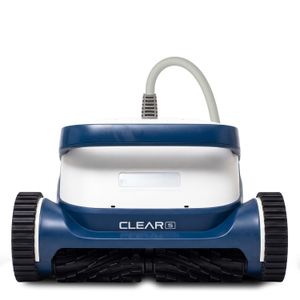
    Clear S handles its timing in the Clear app on your phone, where you set up weekly schedules. What it adds to a timed routine is a choice of six cleaning modes, including Regular at 2 hours, Fast at 1 hour and Ultra at 3 hours, along with Floor only and Waterline only. It cleans floor, walls and waterline in in-ground pools up to 50 ft with 8,500+ GPH of flow and an UltraFilter basket with 1-micron fine panels, and it carries a 3-year limited warranty.

    Best for
    In-ground pool owners who want app-based weekly schedules and a choice of cleaning modes.
    Keep in mind
    Scheduling runs through the app, so it is not the pick if you want a plain button on the power supply.
    See the Clear S
  5. Pick 5: Daily Timer for Pools up to 33 Feet

    Dolphin Cayman

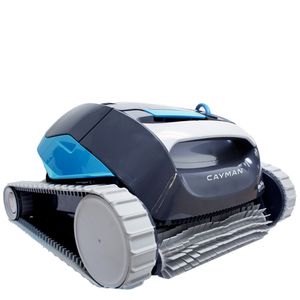
    The Cayman's timer is the simplest of all and the least flexible. It has one setting: it runs every day. For a pool under trees, or any pool that needs a daily pass, that is exactly right, and it costs less than the four robots above. It is also the pick here for above-ground pools and for in-ground pools up to 33 ft. Each cycle takes 2 hours, cleaning the floor and walls into a MaxBin basket that empties through a top hatch.

    Best for
    Smaller in-ground pools and above-ground pools where a clean every single day is the goal.
    Keep in mind
    One setting only, every day, with no way to space cycles out. It cleans floor and walls and stops below the waterline.
    See the Dolphin Cayman

What Matters

Three Questions to Ask About Any Robot Timer

01

Where Do You Set It?

A timer on the power supply works with a button and needs no phone or internet connection. That describes the Premier, Quantum and Cayman. A schedule in an app gives more control but depends on your phone. That describes the Sigma and Clear S, and the Quantum offers it as well.

02

How Much Choice Does It Give?

Presets repeat at a fixed interval: every day, every 2 days or every 3 days on the Premier and Quantum. An app schedule lets you choose particular days and times. A single daily setting gives no choice at all, which is fine if daily is what you want.

03

Will the Filter Keep Up?

A timer starts the cycle whether or not the filter is clean, so unattended runs need capacity and some way of telling you the filter is full. The Premier has a full-filter indicator on its power supply. The Sigma sends a filter alert to your phone, and the Quantum carries an XXL MaxBin basket.

Side by Side

Timer Robots Compared

Specification Dolphin Premier Dolphin Sigma Dolphin Quantum Clear S Dolphin Cayman
Price today $1949 $2349 $1599 $1749 $1049
Cleans Floor, walls and waterline Floor, walls and waterline Floor, walls, waterline, sun shelves and stairs Floor, walls and waterline Floor and walls
Scheduling Weekly timer: every day, every 2 days or every 3 days Weekly scheduler by day and time Weekly timer: every day, every 2 days or every 3 days Weekly schedules in the Clear app Timer: every day
App No app; controls on the power supply myDolphin Plus (Wi-Fi and Bluetooth) myDolphin Plus (Wi-Fi) Clear app (iOS and Android) No app; controls on the power supply
Filtration Multi-Media: NanoFilters, oversized leaf bag and standard fine filters NanoFilters and standard filter cartridges XXL MaxBin basket with standard and NanoFilter panels UltraFilter basket: 1-micron fine and 180-micron coarse panels MaxBin basket with fine panels; NanoFilter panels optional
Brushes Dual scrubbing brushes Quad scrubbing brushes Dual HyperBrush Front and rear active brushes HyperBrush
Navigation SmartNav 2.0 SmartNav 3.0 with gyroscope SmartNav 2.0 Gyroscope and accelerometer SmartNav 2.0
Cable 55 ft with 360° anti-tangle swivel 55 ft with 360° anti-tangle swivel 55 ft with anti-tangle swivel 59 ft anti-tangle 50 ft
Warranty 3 years 3 years 2 years 3 years (limited) 2 years
Shop Buy the Dolphin Premier Buy the Dolphin Sigma Buy the Dolphin Quantum Buy the Clear S Buy the Dolphin Cayman

How Each Timer Works, Side by Side

The word timer hides real differences, so here they are in one place. Read across for where you set it, what choices it gives, and whether a phone is involved.

Two robots are not ranked above. The Escape has no timer as standard; an Automation Timer power supply is an optional upgrade that repeats every 24, 48 or 72 hours. Clear UV keeps time the same way as Clear S. The two are one robot, except that Clear UV adds a built-in UV-C light controlled from the Clear app and costs more.

RobotWhere You Set ItChoicesPhone Needed
Dolphin PremierPower supplyEvery day, every 2 days or every 3 daysNo
Dolphin SigmamyDolphin Plus appChosen days and timesYes
Dolphin QuantumPower supply, plus myDolphin Plus appThe same three presets, plus app schedulesOnly for the app
Clear SClear appWeekly schedulesYes
Dolphin CaymanPower supplyEvery day (one setting)No

Choosing a Rhythm for Your Pool

How often should a timer run? Let the debris decide, not the calendar. Daily cycles suit pools under trees, pools open to wind and dust, and the height of swim season, and they keep each load small. A gap of two days is the usual choice for a lightly shaded pool in summer. Three days is enough for covered pools, cooler months and pools that mostly collect a little dust. Start frequent, look at what the filter holds after two weeks, and lengthen the gap if it keeps coming out nearly empty.

Whatever the rhythm, remember what a timer cannot do. It starts the robot; it does not check that the robot is ready. A basket packed with leaves from one cycle means the next runs with weak suction and nobody watching. Lift the robot out at least once a week, more often in leaf season, and rinse the filter.

Setting Up a Timed Routine

  1. Run the first cycle by hand and watch where the cable lies. Move the power supply if the cable crosses steps or a ladder, because nobody will be there to free it on timed runs.
  2. Pick a regular day to lift the robot out, rinse the filter and look over the brushes. Tie it to something you already do, such as testing the water.
  3. Before a pool party, a chemical treatment or a storm, switch the timer off or take the robot out, and restart it afterward.


SpectraLight pool experts, Mon to Fri 8am to 5:30pm CST

Not sure which robot fits your pool?

Tell a SpectraLight pool expert your pool’s size, surface and what ends up in it, and get a straight answer before you buy.

Call (888) 895-7080

Weekly Timer Questions

What does a weekly timer on a robotic pool cleaner actually do?

It starts cleaning cycles automatically through the week, without anyone pressing a button. On the Premier and Quantum that means a repeat interval chosen on the power supply. On the Sigma and Clear S it means a schedule built in an app. Either way the robot waits in the pool between cycles, and emptying the filter is still your job.

Do I need Wi-Fi or a phone to use the weekly timer?

Not on three of the picks. The Premier, Quantum and Cayman timers are set on the power supply and need no phone, app or Wi-Fi. The Sigma's scheduler and the weekly schedules on Clear S are set in their apps, so those two do need a phone.

Can the robot stay in the pool between timed cycles?

Yes. Robots with a timer or an app schedule are made to stay in the water between scheduled cycles. They should still come out at least weekly so you can empty and rinse the filter, and always before you shock the pool or add chemicals. If the pool will sit unused for a long stretch, store the robot out of the water and out of direct sun.

Can I add a timer to the Dolphin Escape?

Yes, as an upgrade. The Escape has no timer as standard. An optional Automation Timer power supply adds one, repeating every 24, 48 or 72 hours. If you already know you want timed cleaning in a pool up to 33 ft, compare that route with the Cayman, which has a daily timer built in and a longer cable.

The Verdict

Which Timer Fits You

Choose by how you want to set it. A button and three presets, nothing else to manage: the Premier. Particular days and hours from a phone: the Sigma. Both a preset timer and an app: the Quantum. App schedules with a menu of cleaning modes: Clear S. A daily clean in a pool up to 33 ft: the Cayman. Whichever you pick, the timer handles the starting and you handle the filter. Shop pool robots, all with free shipping.