Black Friday SaleFree US shipping on every order
(888) 895-7080
Free Shipping Low Price Guarantee 30-Day Trial & Easy Returns
Free Shipping Low Price Guarantee Speak to a Pool Expert
Free 1–3 Day Shipping on Pool Robots Low Price Guarantee 30-Day Trial & Easy Returns

Buying Guide · Corded, Cordless and Convenience

Best Robotic Pool Cleaner for Unattended Cleaning While You Work or Sleep

A robot that runs with nobody watching has to start itself, stay untangled and say when its filter is full. Here is how five robots handle that.

By the SpectraLight pool experts · Updated November 2026

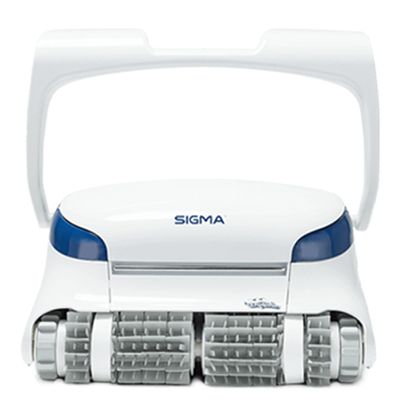
Dolphin Sigma robotic pool cleaner

The Short Answer

The Dolphin Sigma is our first choice for unattended cleaning: it schedules by day and time, steers with a gyroscope, has a swivel cable and sends a filter alert to your phone. The Dolphin Premier does the same job with no app at all: a preset timer and a full-filter indicator on the power supply. For pools up to 33 ft, the Dolphin Cayman runs every day on its own timer.

Debris does the most harm to water in the hours nobody is looking. Leaves that sink at nine in the morning are tea by the weekend, and dust that settles overnight is back in suspension at the first cannonball. The best robotic pool cleaner for unattended cleaning deals with both on a schedule, while you are at work or asleep, so the pool is simply clean when you walk out to it.

Running without supervision changes what matters. Nobody is there to free a robot hung up on a drain, untwist a cable or notice a full filter, so the robot has to avoid the first two and report the third. One rule comes before any feature: nobody swims while a robot is running, so unattended cycles belong in hours when the pool is empty.

Our Picks, in Order

Our Picks for Cleaning With Nobody Home

Every price below is today’s price in our store.

  1. Pick 1: Best Scheduler and Best Self-Reporting

    Dolphin Sigma

    Unattended cleaning has four requirements, and the Sigma meets each with its strongest version. The weekly scheduler in its app sets cycles by day and time, so you can pick mid-morning on workdays and keep weekends clear for swimming. SmartNav 3.0 uses an onboard gyroscope to hold its course, the 55 ft cable has a 360-degree anti-tangle swivel, and a filter alert reaches your phone. Each 2.5-hour cycle sends 4,500 GPH through NanoFilters, so the fine material that clouds water leaves on the same schedule as the leaves.

    Best for
    Owners who are out all day and want to choose exact days and hours, with alerts on a phone.
    Keep in mind
    Scheduling lives in the app, so it needs a phone and a connection to set up, and it is the highest-priced pick.
    See the Dolphin Sigma
  2. Pick 2: Best Unattended Robot With No App

    Dolphin Premier

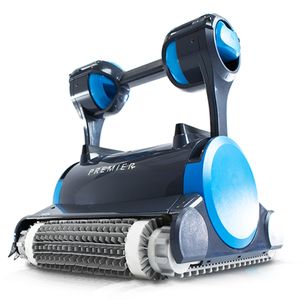
    The Premier proves that unattended does not have to mean connected. Its timer is set on the power supply for every day, every 2 days or every 3 days, and a full-filter indicator on the same box shows at a glance when to empty it. A 360-degree swivel on the 55 ft cable keeps twists from building, and SmartNav 2.0 scanning plans the route. With the oversized leaf bag fitted there is more room for a few days of leaves between emptyings. Nothing depends on a router staying up.

    Best for
    Leafy in-ground pools and owners who want a set-once timer that works with the internet off.
    Keep in mind
    The timer sets an interval, not chosen weekdays, and the filter indicator only helps if someone looks at it.
    See the Dolphin Premier
  3. Pick 3: Gyroscope Navigation and Weekly App Schedules

    Clear S

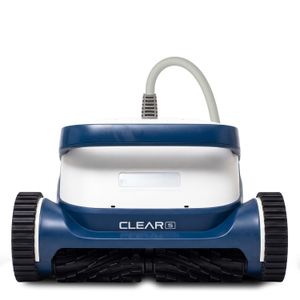
    The Clear S takes third because its navigation suits running alone. A gyroscope and accelerometer guide it, and coverage tightens after two or three cycles, which rewards a robot that runs week after week. The 59 ft cable is anti-tangle, weekly schedules are set in the Clear app, and a 1-hour Fast mode allows a quick pass before you get home. Its 1-micron fine panel holds the silt a coarser filter lets through. We have no filter-full alert to point to, so give it a fixed emptying day.

    Best for
    In-ground pools up to 50 ft whose owners want gyroscope navigation and weekly schedules set in an app.
    Keep in mind
    With no published filter-full signal, emptying runs on your calendar, and schedules need the Clear app.
    See the Clear S
  4. Pick 4: Lowest-Priced Pick With Swivel, Timer and Alerts

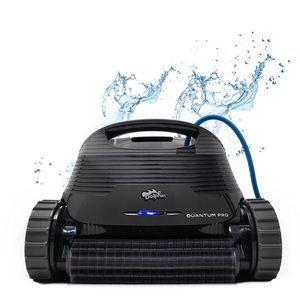
    Dolphin Quantum

    The Quantum covers every unattended requirement at the lowest price of the picks that do. The timer on its power supply runs every day, every 2 days or every 3 days without a phone, and the app adds schedules and alerts over Wi-Fi when you want them. SmartNav 2.0 senses ladders and drains, two common places for a robot to get held up, and the 55 ft cable has an anti-tangle swivel. A 2-hour cycle fits easily inside a workday. It sits fourth because it has no gyroscope and a 2-year warranty.

    Best for
    Owners who want a timer that works on its own today and app alerts they can turn on later.
    Keep in mind
    Alerts need the home Wi-Fi to reach the power supply, and the warranty is 2 years.
    See the Dolphin Quantum
  5. Pick 5: Simplest Daily Timer for Pools up to 33 ft

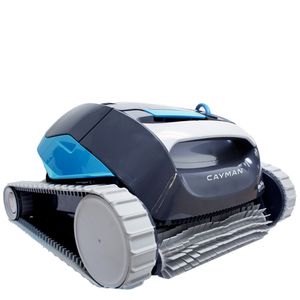
    Dolphin Cayman

    For an uncomplicated pool, the Cayman makes unattended cleaning almost boring. Its timer has one setting, every day, and it lives on the power supply, so there is nothing to program and nothing to connect. In a rectangle, oval or simple freeform up to 33 ft, SmartNav 2.0 and HyperGrip tracks take it around the floor and walls in 2 hours, and the MaxBin basket empties through a top hatch. What it lacks is the safety net: no swivel on the 50 ft cable and no filter-full signal, so plan a weekly look at both.

    Best for
    In-ground and above-ground pools up to 33 ft with simple shapes, and owners who want zero setup.
    Keep in mind
    Lay the cable out straight every few days, since it has no swivel, and note that it does not clean the waterline.
    See the Dolphin Cayman

What Matters

What a Robot Needs When Nobody Is Watching

01

A Way to Start Itself

Unattended starts with a timer or a schedule. The Premier, Quantum and Cayman carry timers on the power supply that need no phone. The Sigma and Clear S schedule by the week in their apps, which lets you choose the days and hours the pool sits empty.

02

Navigation That Avoids Hang-Ups

A robot stuck against a ladder for two hours has cleaned nothing. Scanning navigation, sensing of ladders and drains, and a gyroscope to correct course all cut the odds of a wasted cycle. Simple pool shapes are forgiving; busy ones reward better navigation.

03

A Cable That Does Not Tangle

Twists build up cycle after cycle when nobody resets the cable. A swivel releases them as the robot turns. Without one, the cable needs laying out straight every few days, which is a small job but not an unattended one.

04

A Signal When the Filter Is Full

A full filter does not stop a robot. It keeps driving its route and collecting little. An alert in an app or an indicator on the power supply tells you when to empty it, so scheduled cycles stay useful.

Side by Side

Unattended Cleaning Picks Compared

Specification Dolphin Sigma Dolphin Premier Clear S Dolphin Quantum Dolphin Cayman
Price today $2349 $1949 $1749 $1599 $1049
Power Corded, plugs into a standard outlet Corded, plugs into a standard outlet Corded, plugs into a standard outlet Corded, plugs into a standard outlet Corded, plugs into a standard outlet
Scheduling Weekly scheduler by day and time Weekly timer: every day, every 2 days or every 3 days Weekly schedules in the Clear app Weekly timer: every day, every 2 days or every 3 days Timer: every day
App myDolphin Plus (Wi-Fi and Bluetooth) No app; controls on the power supply Clear app (iOS and Android) myDolphin Plus (Wi-Fi) No app; controls on the power supply
Robot weight 24.6 lb 20.3 lb — 18.3 lb 14.6 lb
Filter access Cartridges Top-load, no tools — Top-load, one-click open Top hatch, one-tab emptying
Cycle time 2.5 hours 3 hours 1, 2 or 3 hours (six modes) 2 hours 2 hours
Cleans Floor, walls and waterline Floor, walls and waterline Floor, walls and waterline Floor, walls, waterline, sun shelves and stairs Floor and walls
Warranty 3 years 3 years 3 years (limited) 2 years 2 years
Shop Buy the Dolphin Sigma Buy the Dolphin Premier Buy the Clear S Buy the Dolphin Quantum Buy the Dolphin Cayman

Choosing the Hours

The best time for an unattended cycle is whenever the pool is reliably empty. For most households that is mid-morning on workdays or the small hours of the night. Many owners also time the cycle for when the pool pump is off, so debris has settled to the floor where the robot can reach it.

App schedulers on the Sigma and Clear S let you name days and times. Power-supply timers on the Premier, Quantum and Cayman repeat at a set interval, so check your manual for how the start time is fixed. If you have an automatic cover, plan cycles for when it is open: a cable across the deck and a closing cover do not mix.

The Weekly Check That Keeps It Unattended

Unattended is not the same as unmaintained. Robots on a timer or schedule are made to stay in the water between cycles, and once a week, more often in leaf season, the robot comes out for five minutes.

  • Empty and rinse the filter, even if no alert has appeared.
  • Run the cable through your hands and lay it out straight, especially on a robot with no swivel.
  • Glance at the brushes and tracks for wrapped hair, string or twigs.
  • Take the robot out before shocking or adding chemicals, and put it back once the water is balanced.

What Unattended Should Not Mean

It should not mean leaving the robot in the water for weeks while you travel: for a long stretch with the pool unused, store it dry and out of direct sun. It should not mean skipping the skimmer basket or the chemistry, which no robot touches. And it never means running with people in the pool.

Two other robots fit this routine. The Clear UV matches the Clear S and adds a built-in UV-C light controlled from the Clear app. The Dolphin Escape joins in only with its optional Automation Timer power supply, which runs it every 24, 48 or 72 hours.

Setting Up Your First Unattended Week

  1. Watch one full cycle before you trust the schedule. You are looking for the one fitting, step or drain your pool uses to trap a robot.
  2. Put the power supply where the cable reaches the far end with slack to spare, at the setback distance your manual gives.
  3. Tell everyone in the house when the robot runs, and move the schedule if those hours stop being empty ones.
  4. Start with the most frequent setting for two weeks, then back off once the filter is coming out half full.


SpectraLight pool experts, Mon to Fri 8am to 5:30pm CST

Not sure which robot fits your pool?

Tell a SpectraLight pool expert your pool’s size, surface and what ends up in it, and get a straight answer before you buy.

Call (888) 895-7080

Unattended Pool Cleaning Questions

Can I run a pool robot overnight while I sleep?

Yes, and it is one of the best times, because the pool is empty and debris has settled. Use the timer or schedule so it starts on its own, make sure nobody will swim, and check the filter each morning for the first few nights to learn how fast it fills.

What happens if the filter fills up while nobody is home?

The robot keeps moving but collects less and less, so later cycles do little. The Sigma and the Quantum send alerts through their apps. The Premier shows a full-filter indicator on the power supply instead. On the other robots, empty the filter on a fixed day.

Does the robot turn itself off when the cycle ends?

Yes. Each robot here runs a fixed cycle and then stops. The Cayman and Quantum stop after 2 hours, the Sigma after 2.5 and the Premier after 3, and the Clear S has 1, 2 and 3 hour modes. The robot then waits in the pool for its next scheduled start.

Does a robotic pool cleaner for unattended cleaning need Wi-Fi?

No. The timers on the Premier, Quantum and Cayman are set on the power supply and need no phone or Wi-Fi. A connection only matters if you want app scheduling or alerts, as on the Sigma, the Clear S and the Quantum's app.

The Verdict

The Rule for Running It Unwatched

Match the robot to how much you want to hear from it. If you want alerts and exact times, the Sigma leads and the Quantum costs less. If you want silence and a timer that simply works, choose the Premier, or the Cayman for a simple pool up to 33 ft. If navigation is your worry, look at the Clear S. Then keep your side of the deal: a weekly filter rinse and an empty pool whenever it runs.