Black Friday SaleFree US shipping on every order
(888) 895-7080
Free Shipping Low Price Guarantee 30-Day Trial & Easy Returns
Free Shipping Low Price Guarantee Speak to a Pool Expert
Free 1–3 Day Shipping on Pool Robots Low Price Guarantee 30-Day Trial & Easy Returns

Buying Guide · Robot Features

Robotic Pool Cleaners With Remote Control: What You Can Steer From a Phone

No robot in this guide comes with a handheld remote, so we ranked the four you can control from a phone, starting with the two you can actually steer.

By the SpectraLight pool experts · Updated November 2026

Clear S robotic pool cleaner

The Short Answer

The Clear S is our pick: its app includes manual joystick driving, the closest thing to a true remote control, plus weekly schedules and six cleaning modes. The Clear UV drives the same way and adds a built-in UV-C light you control from the app. To command instead of steer, choose the Dolphin Sigma for Siri voice control or the Dolphin Quantum for app control at a lower price.

Search for the best robotic pool cleaner with remote control and you will find pages describing a plastic handset that today's robots no longer ship with. We would rather be straight with you: not one robot in this guide comes with a handheld remote. Remote control now means an app on your phone, and what that app can do varies a great deal from one robot to the next.

It matters for the water more than you might expect. Dirt does not settle evenly. A storm leaves a drift of silt in the deep end, a return jet parks fines in the same corner every week, and that one patch is what makes otherwise clear water look tired. Sending the robot straight there is what remote control is really for.

Our Picks, in Order

Our Remote Control Picks, Ranked by What the Phone Can Do

Every price below is today’s price in our store.

  1. Pick 1: Closest Thing to a True Remote: Joystick Driving

    Clear S

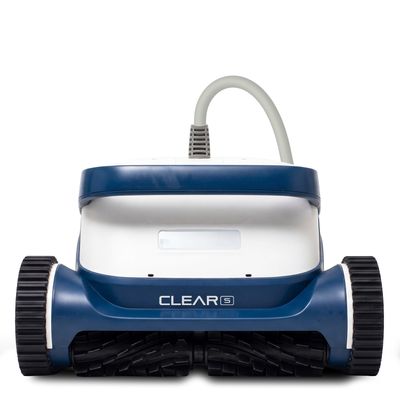
    If you want a remote so you can point the robot at a mess, this is the one to buy. The Clear app for iOS and Android includes manual joystick driving, so you can steer to the silt drift in the deep end or the leaves by the steps instead of waiting for the cycle to find them. The same app sets weekly schedules, shows live pool temperature and switches between six modes.

    Put the phone down and a gyroscope and accelerometer take over, while the UltraFilter basket's 1-micron fine panels take the haze out of the patch you just drove to.

    Best for
    In-ground pool owners who want to steer the robot to a problem spot and still keep a weekly schedule.
    Keep in mind
    There is no handheld remote in the box; all control runs through the Clear app. In-ground residential pools up to 50 ft only.
    See the Clear S
  2. Pick 2: Same Joystick Control, With an App-Controlled UV-C Light

    Clear UV

    The Clear UV is the same robot as the Clear S with one addition: a built-in UV-C light that you control from the Clear app. Everything about remote control is identical. You get the joystick driving, the weekly schedules, the live temperature reading and the same six modes.

    That is why it sits second and not first. For remote control alone, the higher price buys you nothing extra to drive. Choose it when you want the light as well and like running every function from one app. Check the live price on each card, because the gap between the two can shift.

    Best for
    Owners who want joystick driving and also want the built-in UV-C light, all run from the Clear app.
    Keep in mind
    It costs more than the Clear S and steers no differently. The light itself is built in and controlled from the app.
    See the Clear UV
  3. Pick 3: Best Dolphin for Voice and App Commands

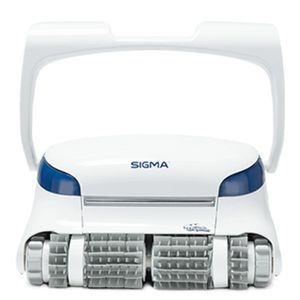
    Dolphin Sigma

    The Sigma is the most connected Dolphin in this guide. Its myDolphin Plus app works over both Wi-Fi and Bluetooth, sets a weekly schedule by day and time, sends a filter alert when the cartridges need attention and takes Siri voice commands, so you can start a clean without opening the app at all.

    What we will not tell you is that it steers like a joystick. Its app commands the robot; it does not drive it. In exchange you get three commercial-grade ProLine motors, quad scrubbing brushes and SmartNav 3.0 with an onboard gyroscope planning the route for you.

    Best for
    Owners who would rather tap or say start and let a top-tier robot plan its own route.
    Keep in mind
    No joystick driving is listed, and it is the highest-priced Dolphin in this guide. For spot-steering, choose the Clear S.
    See the Dolphin Sigma
  4. Pick 4: App Control at the Lowest Price on This Page

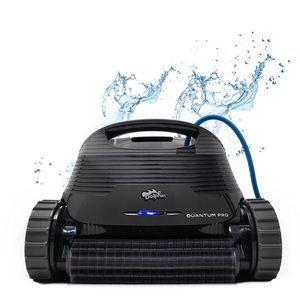
    Dolphin Quantum

    The Quantum gives you the core of remote control without paying for the highest-priced picks on this page. Its myDolphin Plus app connects over Wi-Fi and lets you start and stop the robot, set a schedule, choose cleaning modes and receive alerts. That covers what most owners do from a phone: start a cycle before guests arrive, or stop one so the kids can swim.

    It also lists something the other three do not: a weekly timer on the power supply that runs every day, every 2 days or every 3 days with no phone involved.

    Best for
    Owners who want to start, stop and schedule from a phone and keep a no-phone timer as a fallback.
    Keep in mind
    No joystick driving is listed, and its app is listed over Wi-Fi, so a weak signal at the power supply limits it.
    See the Dolphin Quantum

What Matters

What Remote Control Means on a Pool Robot Today

01

Steering Versus Starting

There are two kinds of remote control. One lets you drive the robot yourself, like a joystick. The other lets you start, stop and schedule a cycle that the robot then runs unaided. Only the Clear S and Clear UV list joystick driving; the Dolphin apps command the robot.

02

How the Phone Reaches the Robot

The Sigma connects over Wi-Fi and Bluetooth, the Quantum over Wi-Fi. For any Wi-Fi robot, check that your home network reaches the spot where the power supply will sit before you count on controlling it from indoors.

03

Modes You Can Pick From the App

A remote is only as useful as the choices it gives you. The Clear app offers six modes, including Floor only, Waterline only and a one-hour Fast cycle, which is how you target a problem without running the full routine.

04

What Happens When Nobody Is Driving

You will steer a robot for a few minutes a month. The rest of the time it navigates alone, so the schedule matters more to water clarity than the joystick does. A weekly schedule is what keeps fine debris from building up.

Side by Side

Remote Control Picks Compared Side by Side

Specification Clear S Clear UV Dolphin Sigma Dolphin Quantum
Price today $1749 $1999 $2349 $1599
Cleans Floor, walls and waterline Floor, walls and waterline Floor, walls and waterline Floor, walls, waterline, sun shelves and stairs
Scheduling Weekly schedules in the Clear app Weekly schedules in the Clear app Weekly scheduler by day and time Weekly timer: every day, every 2 days or every 3 days
App Clear app (iOS and Android) Clear app (iOS and Android), with UV-C light control myDolphin Plus (Wi-Fi and Bluetooth) myDolphin Plus (Wi-Fi)
Filtration UltraFilter basket: 1-micron fine and 180-micron coarse panels UltraFilter basket: 1-micron fine and 180-micron coarse panels NanoFilters and standard filter cartridges XXL MaxBin basket with standard and NanoFilter panels
Brushes Front and rear active brushes Front and rear active brushes Quad scrubbing brushes Dual HyperBrush
Navigation Gyroscope and accelerometer Gyroscope and accelerometer SmartNav 3.0 with gyroscope SmartNav 2.0
Cable 59 ft anti-tangle 59 ft anti-tangle 55 ft with 360° anti-tangle swivel 55 ft with anti-tangle swivel
Warranty 3 years (limited) 3 years (limited) 3 years 2 years
Shop Buy the Clear S Buy the Clear UV Buy the Dolphin Sigma Buy the Dolphin Quantum

How Often You Will Really Steer a Pool Robot

Here is the honest part. Joystick driving is fun for a week and useful for a few minutes a month after that. A robot that navigates unaided covers the floor, walls and waterline more evenly than a person steering from the deck.

So set a schedule for the routine and keep manual steering for the exceptions, which usually look like this:

  • After a storm, when wind has pushed silt and leaf fragments into one end of the pool.
  • Before guests arrive, when the pool is clean except for the corner where a return jet parks debris.
  • After you brush a step or a wall and want the robot under the cloud while it is still settling.

What Each Robot Lets You Do From a Phone

The table below sticks to what each robot lists. Where a function is not listed, we have left it out instead of guessing, and that includes manual steering on the Dolphins.

One detail before you read it: a phone app does not replace the power supply. Every robot here is still corded, and the power supply still sits near an outlet, back from the water. If one function is the reason you are buying, chat with a pool expert before you order.

RobotControlled ByFrom the PhoneManual Steering
Clear SClear app, iOS and AndroidWeekly schedules, six modes, live pool temperatureYes, joystick driving
Clear UVClear app, iOS and AndroidSame as Clear S, plus the built-in lightYes, joystick driving
Dolphin SigmamyDolphin Plus over Wi-Fi and Bluetooth, SiriSchedule by day and time, filter alert, voice controlNot listed
Dolphin QuantummyDolphin Plus over Wi-Fi, timer on the power supplyStart, stop, schedule, cleaning modes, alertsNot listed

The Robots With No Phone Control at All

Three robots are left off this page on purpose. The Premier, Cayman and Escape have no app and no wireless connection; each is controlled at its power supply. That is less a flaw than a different idea of convenience. The Premier's weekly timer and the Cayman's every-day timer are set once on the power supply and then run without a phone, a password or a signal.

If all you want from a remote is to stop walking out to press start, a timer does that job for good.

Getting More From App Control

  1. Stand where the power supply will sit and check your phone's Wi-Fi signal before you order a Wi-Fi robot.
  2. Set the weekly schedule on day one. Treat the app as a way to add or stop cycles, not as something you must remember to open.
  3. For a quick tidy on a Clear robot, pick Floor only or the one-hour Fast mode, then steer to the patch if it is still there.
  4. Do not expect steering to extend the robot's reach. Top steps and water shallower than the Clear's 2.5 ft working depth still need a hand brush.

SpectraLight pool experts, Mon to Fri 8am to 5:30pm CST

Not sure which robot fits your pool?

Tell a SpectraLight pool expert your pool’s size, surface and what ends up in it, and get a straight answer before you buy.

Call (888) 895-7080

Remote Control Questions We Hear Most

Does any robotic pool cleaner with remote control still come with a handheld remote?

Not among the robots in this guide. None of them ships with a handheld remote. The Clear S and Clear UV are controlled through the Clear app and the Sigma and Quantum through myDolphin Plus.

Can I steer a Dolphin Sigma or Quantum from my phone like a remote-control car?

We would not buy either one for that. The Sigma's app is listed for scheduling by day and time, filter alerts and Siri voice control; the Quantum's for start, stop, scheduling, cleaning modes and alerts. Manual joystick driving is listed only for the Clear S and Clear UV.

Is joystick driving a good way to clean the whole pool?

No, and it is not meant to be. Steering by hand is slower and less even than the robot's own navigation. Use the joystick to send the robot to one spot, then hand control back to an automatic mode or the weekly schedule.

Does the Clear UV need a separate remote for its light?

No. The Clear UV's built-in UV-C light is controlled from the Clear app, the same app that handles joystick driving, schedules and modes. That is the full extent of what we will say about the light. In every other respect the robot matches the Clear S.

The Verdict

Our Verdict: Decide What the Remote Is For

If you want to drive the robot to a spot, buy the Clear S, or the Clear UV if you also want its app-controlled light. If you want to command a robot that plans its own route, the Sigma gives you voice, Wi-Fi and Bluetooth, and the Quantum gives you app control plus a no-phone timer for less. Shop pool robots to compare live prices.